*Yes, I know I owe you a chapter. I have slated for today going over the backlog. yesterday’s editing of the stories going free this week took longer than I expected. Sorry.*
I don’t get a commission form Filter Forge. Which sucks. Because I could use the extra income.
Okay — what is Filter Forge?
It’s the best program I’ve found to make a photograph look drawn or painted. (And yes, I have used the ones in GIMP. Trust me, nothing like.) But there might be others I’ve never got to.
I bought Filter forge because I was bored. No, forget that, I was not bored, I was harrassed. I’d been working all day and this spam advertisement came over email. The way they presented themselves I thought they were a filter for photoshop (they’re that too) which I don’t even own. But I needed to rotate the cat, so I went to look.
Turned out it could work as an independent program, so I downloaded the free trial. And it worked. And I bought it. And I’ve used it for covers.
For instance, for Witchfinder, the background is a painting by a nineteenth century painter (yes, I’m too lazy to look it up. Deal. the dragon is purchased, but the only man in regency attire who didn’t have the “just rendered” plastic doll look was a photograph from an Eastern photographer. I had to hand draw the difference in the pants, (his had a single fly, of course) and eliminate his seventies belt buckle.) And then I needed something to make him fit in the cover. I used filter forge oil painting filter and then layered that at 50% transparency over the photograph.
 In the process I ended up buying the pro version, because I needed to do a print edition, which required me to manipulate bigger files. Don’t worry about that unless you’re doing print.
Now, for this one oil painting worked, but clearly it’s not the best for all of them. For instance, last night I used two layers, aquarelle and oil painting to do this (which I’m setting to go free tomorrow.)
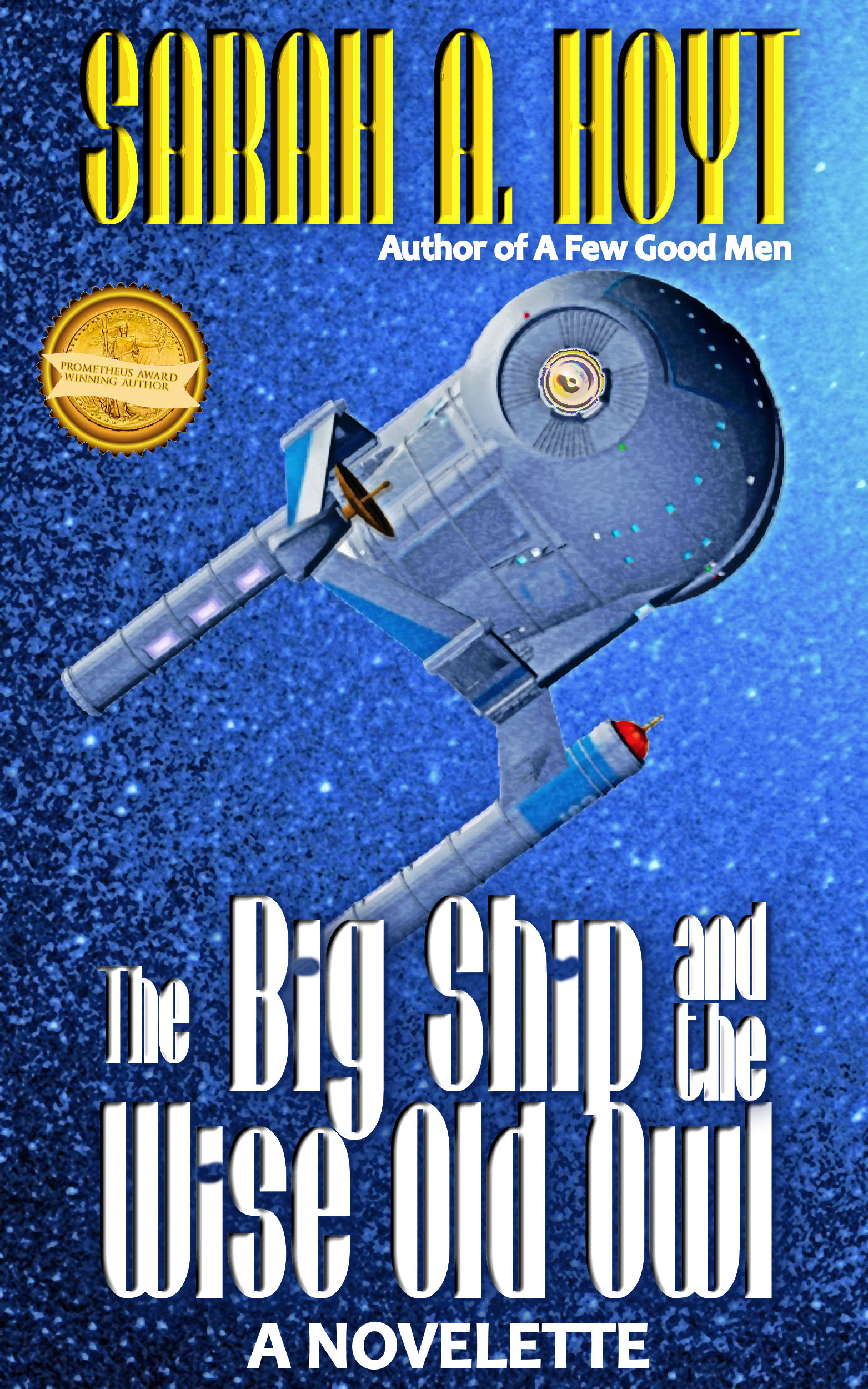 Yes, it’s very cluttered, but that’s mostly the title. Someone please remind me why I felt the need to give the poor story a long honking title. Not cool in digital.
But the image is fine…
Then there’s the cover with just aquarelle — will also go free tomorrow —
 And for much more transformation, there’s the cover of my husband’s book, coming out next month, which I used something on I’d never used on a cover
 It’s a filter called “Artistic Rendering.” No, I’m not joking.
So, what are the steps to take if you’ve bought Filter Forge? Well, first you go to the Filter Forge Site, and look under filters, effects, creative. Then look through all the filters that look like they might be useful. Then TRY THEM on every picture you want to transform. What works with a picture looks awful with others.
What you want to convey with it varies too. With Dan’s cover it was very important to convey that the story is based on an attempt to recreate the Roman empire in space and also that it wasn’t mil sf. (Not that we’d MIND mil sf numbers, but if you go in expecting mil sf, you’re going to be disappointed. We also wanted a certain nostalgia look to it, so… this worked. (Also I drew the helmet and we needed to hide my clumsiness.)
So, just for fun, let me run filters to show you what filter forge does. Some of you will remember my image from the cover of After the Sabines. It’s a photograph, from Morgue File, by Nino Andonis.

And I didn’t do anything to it, because it’s an old cover. I’ve been meaning to redo it anyway, so I’m going to run it by a few filters and give you the name of the filter, so you can see the different looks.
 This is a filter called “A watercolor painting”
 This is acrylic painting. As you see it’s much more photo realistic.
 This is a filter improbably named “Skawn.
 This one is more obviously “painted” and it’s from a filter called Artomatic.
I could be here all morning, and I don’t want to. Remember for some of the more “artistic” effects you might have to use it as a layer atop the original and pump it to say 50% transparency — because it’s important for covers to be clear even in thumb nail.
Remember Dorothy Grant’s posts on covers, helpfully compiled by our Cedar. Clarity of image matters.
Now go and have fun.




 Mad Genius Club
41 responses to “This is NOT an Advertisement for Filter Forge”
I’ve been playing around with the trial version of Filter Forge, and really like what it’s capable of. It seems it’s capable of even more than I realized, so now to find a tutorial.
Honestly, this is the only thing that will make my cover not look like crap as things stand right now. The fact that’s it’s reasonably priced is pretty nice as well. 🙂
Stink. Stinkety stinkstink stink. On a cracker. And after emails last night specifically saying as how I do not like mucking about with images and putting together covers. I do NOT WANT to spend more money on a program that I can’t effectively use (Yes, I love Scrivener, but mostly I’m waiting for the iPad version, as that’s what I use for my writing. Pages sucks, but it gets the job done, and I don’t WANT to take the time to learn to use it effectively.) and for which I don’t have a good computer. My laptop, which has been relegated to storage, is six years old, and the design was almost two years old when I bought it. Yeah, it still works, yes, I upgraded the RAM and the HDD. But the Q button doesn’t work anymore (and you wouldn’t believe how many words you suddenly use when a single key isn’t functioning) and the screen feels small (at 17″) and it’s HEAVY and I want a new desktop for all the things, but I don’t want to pay for it.
*cough*
[/whine]
I think I need to do this, get this, and at least learn how to use it. Dammitalltohell.
I dread the day my MacPro 17″ croaks. The new laptops are toys (no DVD or ethernet?!!!?) and I don’t want to upgrade all my apps.
My 3 year old son spilled a glass of wine on my 17″ Macbook Pro when I stepped away from my desk for 2 minutes. It did not survive, and he came perilously close to death himself.
I was forced to buy one of the new 15″ models as a replacement…and I was not expecting to like it as much as I do. Like you, I wanted the internal disk drive and the really big screen. But that retina display is so sharp I can go to REALLY high resolution so I have basically the same amount of usable space and without that drive it’s freaking thin and light. I bought the external disk drive because necessity, and I’m really happy overall.
But my son can never go to College. Computing the time value of money 15 years from now, I figure I spent a year of his tuition on the new machine.
To the Navy with him, I say! And he’ll be better for it!
😉
Unless he really doesn’t want to.
Then he can go Air Force!
My boys are in college so I don’t have that excuse for spilled drinks. 🙂
I’m chained to Snow Leopard by Quicken 2005. I’ve been using Quicken since 1993 (release 3 I think) and I don’t trust any other program to handle that much data or last that long. Q2007 has a version that runs on Lion but their new “Essentials” is a piece of crap. It doesn’t have half the things I USE in Q2005.
Just checked wikipedia to verify how long Quicken has been around.
“Many features of Q 2007 for Lion simply do not work (e.g.: stock split transactions in investment accounts), and Intuit’s support for this product is virtually non-existent.[citation needed]”
ARGH! How can you track Apple stock without stock splits?!!? This is the very issue that makes Essentials a no-go for me.
Sorry for the digression. This has been really stressing me out for a few years now.
I feel your pain. I only had two complaints when I shifted from PC to Mac. First was the lack of games. PS-3 solved that. Second was how much the Mac version of certain programs that I loved and used every day (Quicken chief among them) SUCKS!!!! And then, over time, instead of getting better, the Mac versions have only come to suck worse!
I haven’t used Quicken in several years, for that reason. It’s really a shame, because in the PC version at least, it’s an extremely powerful and valuable program.
*sigh*
What do you use instead of Quicken or do you just wing the finances?
Spreadsheets mostly, and good old fashioned keeping track by hand for the month-to-month stuff.
It’s far from ideal, but it works. Though every now and then I’m tempted to buy a cheap PC, just for games and Quicken. Alas, other expenditures must take priority though.
Gah! I remember doing our finances on paper spreadsheets. VisiCalc was the first killer app for a very good reason!
Have you considered USAA? They’ve utterly destroyed their “budget” feature recently, but their “scheduled transactions” is wonderful.
Plus, they have really great insurance for your cars and home/rental.
I’ve been a USAA member for seventeen years. 🙂 Love them. Never looked into their budgeteering tools though. Didn’t know about them, to be honest. I’ve basically ignored everything except insurance and banking.
Note to self…
Thanks!
🙂
Welcome! We rent, so I use their pay-by-mail system to make it very clear to our land-lord that they can’t play any stupid games. (Yes, it’s sad, but bad actors make it so one must be cautious.)
Haven’t been burnt yet.
Good idea.
Back before we bought our house, I just got my landlord’s bank account and routing number and set up a Navy allotment straight to his/her account. Worked like a charm and I never had to think about it at all. 🙂
It’s more because of our local post office than because of our land lord, but… it never hurts to have a few extra arrows.
For those going “huh?”
If you are a military or honorably discharged person, you can join; if a parent or grandparent is such, they can join and then you can join; and when you are looking for the budget stuff, you go into the checking account and click the “Scheduled transactions” to add things like the rent, monthly bills, etc to your “budget.”
I don’t trust the gov’t to pay us, so the “projected balance” is our budget. (yes, we have other savings, but they don’t exist for my consideration)
I gotta get my sister to playing with this stuff.
How does Forge Filter compare to Corel Photo-Paint? I’ve played around with the filters in Corel a few times and have never gotten the look that I want. I use it primarily to edit photos anyway. (Never mind how old my copy is.) With XP being no longer supported, I am forced to look for replacement software.
Filter forge (sorry, did I call it Forge Filter? I have a dire shortage of caffeine) is MUCh better.
Cool. I’ll add it to my list of programs to check out. 🙂
This is very cool. A couple of questions. Does Filter Forge make the transparencies? Also, someone told me that the more you manipulate a photo, the more pixels you lose. Are your images photos or downloaded, if I may ask?
No, I play with transparency etc in JASC paintshop pro 9. Because.
They’re downloaded. The last set is downloaded from morguefile, which is free.
Aaaaaaaaaand now I’m lost.
LC next year? I can show you in like ten seconds. it’s the distance…
I appreciate the offer. Unfortunately, I’m going to need to figure it out before then.
I’ve got a book I’m hoping to have out by September 1. 🙂
The starship on your cover looks suspiciously like it was designed by Starfleet. 😉
You don’t think Starfleet answers to beautiful space princesses????
Depends if “Evil Space Princess” is in the chain of command or not.
She’s not. If she was in charge of Star Fleet or the Federation, they’d both be more realistic. [Wink]
And useful. OTOH I’d be really upset because I hate ordering people around.
Impossible. Cora Butthurt says you’re a fascist, and everyone knows fascists boss people around. Right?
Right?
Anyone?
Cora Butthurt needs to get a dictionary and look up fascist. Under I’m regime of power I leave people strictly alone.
TREMBLE!
But, don’t you see? You’re telling people they have to think for themselves!
TYRANT! 😛
Nope. Fear of her can motivate Starfleet just as much. Klingon, Cardassian, Dominion, they’re ready for it. Beautiful Space Princesses? Not so much.
I took a render and rendered it some more. Eh.
Has anyone gotten Filter Forge to play well with Gimp? I’ve seen a few people saying they have, but the Gimp boards say the two are not compatible.
You could probably use the standalone version and then bring the result into Gimp.
I’m far to used to Photoshop. I had 5.0 (not CS) for my ancient Mac, and when they let the old Creative suite go free, I snagged that for my PC (These days to get to that site you need to create an Adobe account. I think they wised up). I just could never get Gimp to work the way I wanted, and it didn’t work with my tablet. Not that I’m any good with the tablet, mind you.
Yep. That’s what I do. only I use paintshop.
OK, I bit the bullet and bought it. It looks . . . dangerous. As in time-sucking-where-did-the-afternoon-go-isn’t-this-cool-what-if-I dangerous.
Good Lord YES
I have to fight myself not to play with it…
Now I *really* need to get that next book out. Ah well, at least it was 80% off. Will play with it later since playing with it tonight means I am not writing. xD;