
In last week’s post I asked for thoughts on what people wanted to see updated on the Navigating to Publishing list. The ones most mentioned were categories, keywords, marketing and advertising. All of these are linked, flowing from one into the others, so while there will be at least one guest post by a subject matter expert, I’ll get y’all started off with the first thing you have to do while setting your book up for publication on the Amazon dashboard. This post will be Amazon-centric, as I haven’t published a book wide in years. Still, much of the information will be useful elsewhere as well, just not in the same way as it is for the biggest bookseller in the world.
It used to be that you could put your book in up to ten categories. This was changed in the latter part of 2023, and you can now select three categories. Categories are the broad buckets Amazon uses to help readers find books they like, so as you can imagine, it’s important to put your book in the best categories. Which also means not putting them into the broadest categories – a book placed into ‘fantasy’ is a tiny minnow swimming in a whole ocean, while a book placed into something like ‘dark fantasy horror’ is a trout in a fishing hole, and much more likely to find a reader who really wants it.
KindleTrends has a great (and free!) tool for researching categories on Amazon.
BookLink also has a ton of free tools for researching, and while you can use it to find the best categories for an already-published book, you could also enter the ASIN of a book that is very similar to a planned publication, to give you some guidance while you are setting your new book up. Their website isn’t the easiest to use, so read carefully.
For a powerful tool, but one that will cost you – as a businessperson, market research tools, used properly, are worth the price – you should definitely look at Publisher Rocket. If you are a brand-newbie on a shoestring budget, put this in your pocket for later, earn your way to it with the free tools and more application of your time and elbow-grease.
KindleTrends will give you the ability to see which categories are performing well on the ‘Zon marketplace. There is a massive amount of information here, and I encourage you to get a notebook, and go explore. Click on buttons and dots on charts and see what happens. You may find that the top level category for your book isn’t what you thought it would be. You might realize that the ‘quiet’ category isn’t the best one to put your book in if you can also use ‘red hot’s or ‘busy’ categories that fit the book.

I would caution against writing your book to a trend. Write the story, then figure out what categories it belongs in. For one things, trends are a moving target. For another, if you don’t like, say, ‘dark fantasy horror’ then don’t write a book just because that category was doing well when you did your research. Also, don’t put a book in a category where it doesn’t belong. Readers will not enjoy the book, you’ll get bad reviews, and Amazon will change your category. Which is the last factor in this equation – Amazon will put your book in categories based on keywords and other calculations, so while you get to pick three, Amazon will put it in front of readers based on the algorithms. Or not. Do your homework, and you are far more likely to get your book in front of your readers.

This is what the categories look like when you are shopping on Amazon. Note that the cascade which starts with ‘Kindle Store’ goes down to ebooks (versus all books), literature and fiction, and then gets into the interesting divisions. Go look and see what your favorite book is categorized as. Once you have search up the book, scroll down until you find ‘product details’
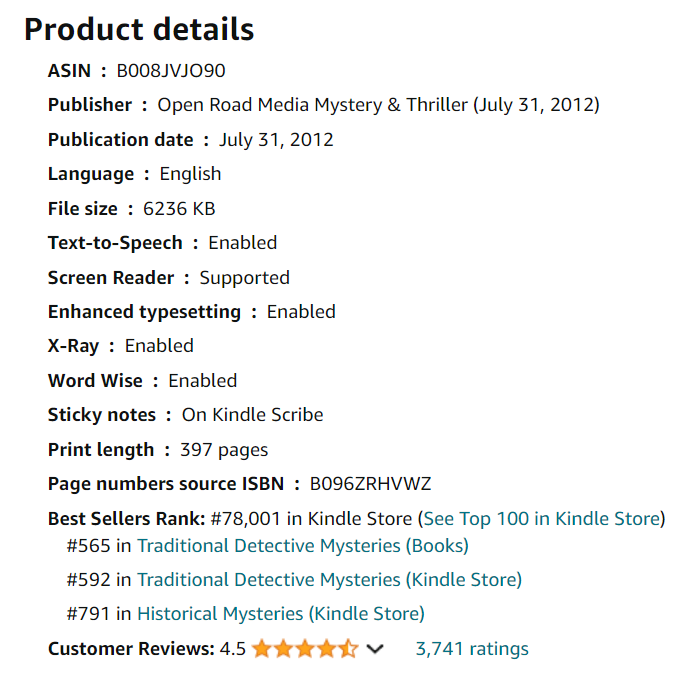
Click on one of those rankings. For mine (Busman’s Honeymoon by Dorothy Sayers, for the exercise in this post) I’ll select Traditional Detective Mysteries (Kindle Store). This link brings me to the Amazon Best Sellers for that category.

See how this is subtly different than the first dropdown? What results do you get from your book? Do you see how fuzzy those categories are, how a book could be in several of them? If that’s the case with your book, being able to see the trends with one of the tools above will really help you position your book in a hot category that is being searched and read more than another your book might also fit into.
Next week I’ll go on to talk about keywords, the finding and use of them. Please let me know in the comments what else you need to successfully publish your book, and we’ll see what we can do to help.

 Mad Genius Club
7 responses to “Categories on Amazon”
Why am I in so many ‘Arborist’ categories? I mean, Amazon is really messed up now.
Not so sure I understand the BkLNK tool, as it’s throwing out a lot of noise at the end of the category lists, which when I check them, I’m not in them? Not that I can see. Kinda confusing.
Interesting. I suspect that’s Booklink, not Amazon. There may be something else that shares the numbers and it’s pulling that in as well.
I’m using the ASIN number. Nothing shares those on Amazon, they’re unique. Either a bug in his code, or Amazon has an issue? Hard to say.
Pretty sure it’s Booklink; tested it on my most recent (7 months old) release and got arborist category noise as well. Wolf’s Trail does have people doing stuff in forests, but when I enter my book Shadow Captain (space opera, pretty treeless from what I can remember) in, I still get arborist category noise.
This is a very useful post. Thanks!
But now I have a bunch of work to do. 😦
Your keywords can also throw you into a category. “Devil” may throw you into “Dark Fantasy.”
[…] of the series of updates to the Navigating to Publication list. Last week, we covered setting up categories for your book, this week we’ll give you some resources for setting up the most important factor in getting […]