I’ve been dubious about the merits of making book trailers, or little promo videos, for books. Video watchers and book readers… was there an overlap? Was there enough of one for me to take the precious time I had and learn the skills to make videos? Well, seeing that BookTok is a huge thing, and it’s on YouTube as well, it seems that readers and watchers do overlap. Also, since I’m now fully committed to earning a living from my wits, making my YouTube channel into an asset seemed like a good idea. So I started looking into the video tools out there.
It turns out, for making a wee little video to promote a book, you can do the whole thing on your phone. Well. In my case, a bit of this, a bit of that. But I compiled the video on my phone.
Here’s the thing: I put that video up on The Tube of Yoos, where it has gotten 143 views, and on Facebook, where it has 184, neither of which are large numbers, but on Facebook that’s more interaction than my still images got. Facebook is so throttled and tilted towards video it is absolutely ridiculous. I don’t know about TikTok, I don’t do the Tok, I pay someone to do it for me, and she does her own video things. Still, with the interactions on Facebook alone, I’d say it was worth my having attempted this, and I’ll be doing it with other books now that I have bought the tools!
It’s not that difficult. It does require having some tools, and although there are free versions, they will be limiting if you are burning through time/credits to learn, and in the music app’s case, you need the pro level to have the copyright for commercial use. Always read the ToS.
I’d been practicing in the run-up to publication of The Groundskeeper: Have a Dead Night using videos I took with my phone in the garden. Since my Youtube channel is tilted towards my garden and my art, those little flower videos have done pretty well. I don’t ever expect to go viral with one of them and frankly that is a good thing. Slow organic growth is much more sustainable than suddenly! all the people who have no idea who and what you are and will wander off again to find the next Big Thing.
I got the idea for the book video from Grok, when I asked about marketing ideas for the book. It gave me a script, and clear actionable steps to take, which helped a lot! This is what it said to do:
TikTok / Reels: “Cozy Graveyard ASMR”Script (15-sec):,
[Soft rain SFX, teacup clink, glowing ghost cat]
“POV: You’re the new groundskeeper… and the ghosts want tea.”
→ Cut to Chloe whispering to a skeleton.
Text overlay: “Cozy mystery + cemetery BFFs ”
Sound: trending cozy lo-fi (search “cozy booktok rain”) Action: Post 3x/week. Use #CozyMystery #GhostTok #BookTea (yes, tea).
I didn’t follow all of that. Some of it was because it was things I don’t know how to do yet, like adding sound effects. However, if I animate a MidJourney image, I get a five second video, and if I extend that, I get nine seconds. So… two animated images, one extended, would be the right length. Most of these tiny promo videos are at most thirty seconds long, and evidently shorter is better. There are a lot of apps which will animate any image, so if you don’t use MidJourney you’ll want to research those. In MidJourney you can upload and edit an image on the website (desktop) and this will enable you to animate an image you didn’t make in MidJourney.
Tools I used for this included these apps:
I also did some editing on the images in Affinity Photo, but unfortunately due to Affinity’s recent buyout by Canva I can no longer whole-heartedly recommend them. Yes, it’s ‘free’ but I sense there are hooks in the offing you can’t see just yet. If you can still buy Affinity suite V2 and hold the license, do that. Anyway, off my ranting box that crept up under me!
With the MidJourney image, which I rendered to represent my MC Chloe, using a character reference image to keep continuity, and the skeletal housekeeper Della, I chose to animate in low motion. The book (the whole series) is a cozy, so slower is better. Which is also what I was thinking about in telling Suno what mood music I wanted for the background. I have two, this is the one I used for the above micro-video, Whispers Between Pages, and I went on to get another called Cocoa on a Rainy Night which I’ll use for later videos of this series. Suno is a lot of fun. I went ahead and picked up the pro subscription and have been messing around a lot. The music in the butterfly video is what happens when I realize that I can ask for a ukulele and balalaika duet and get it!

To generate mood music, I’m not giving Suno a lot of details. Literally, the mood I want to evoke. It’s surprisingly good at this, although I suspect if I knew what musical terms, instruments, and so on, it would be even better. I am not a musician, however, and the only thing I get somewhat able to play was the ukulele (my hands were too small for the balalaika I once owned).

Once I had my video elements, and the music, I started to put the pieces together in InShot. This is a phone-only app. I have video editing softwares on the desktop but frankly they are intense and while I can make OBS work, most of the time, and I’m getting better with Open Shot Video Editor, there are a lot of moving parts and I wasn’t even sure I could do the video in the phone format with it. So. A phone video editor seemed like the idea, I did a little research into which ones were easy and not too invasive, and then played with the free version a bit before committing to the pro level which removed the watermark from my videos.


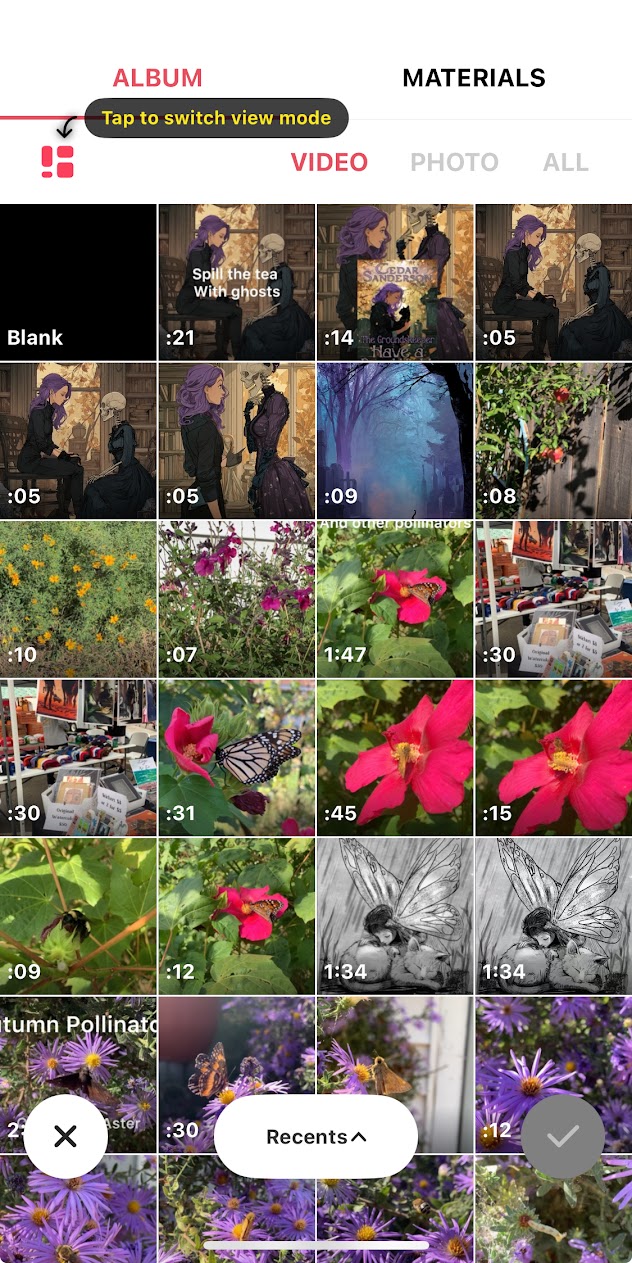
Once you open the app, and tap on the video icon, you’ll get an array of the video clips you have loaded on your phone library. You can select one or many, and it took me an embarrassingly long time to figure this out, but you can also click the photo tab and add a still image, like the cover of the book in question *facepalm* I did eventually grasp that, at least, and now you know so you don’t get frustrated. It will not animate the photos you add, although I think there is also a tool for that in this app.

The whole setup is very icon heavy, which is fine, if you know what all the pictographs mean. I did a lot of button pushing and figuring out what I was looking at. The audio button allows you to add your custom music in over the video tracks and any images you just compiled.

Clicking into audio, you have options. I have either saved the music to a local file, and can now grab it from there, or you can import the music into InShot at that imported tab, which I presume means it would be available across devices. The music will automatically clip off at the end of the video segments. I’m sure that there’s a way to adjust where the music segments start and end, I haven’t played that much with it yet.

The other thing you’ll want to pay attention to are the transitions between the segments of video. There are a TON of options. It is kind of fun to play around with. Some are jarring. I was trying to keep it simple with my video as it’s so short. But you do want a little fade or something here to keep the video from looking jumpy as it cuts over segments.
You can add text, which I have done to tell the viewer what’s going on, voiceovers which I have not used, and you can add stickers. Now, that last is useful because you can add custom stickers from your images, which is where I added in the series logo, then the cover, to finish filling in the information for the viewer and giving them context. Not to mention making this an actual marketing tool.
This isn’t going to be a direct driver of sales. You will find that if you include a link in the description or hashtag section, it will be throttled as will any post like that on any social media. This is a branding tool. The more you can intrigue a potential customer, make a thing that appeals to them, and the more they see something until they recognize it (at least four times, the books all say) the more likely they are to trust and buy the product. Once you make a single video, you may as well make several… for every book. Then, if you do that 3x weekly posting Grok mentioned, you aren’t flooding your feeds with spamming one book, at least. I don’t recommend spamming… and never, ever, share book promo in any social media group without checking the rules first. Watched yet another young Indie do that yesterday morning and when the mod for some groups woke up there were a lot of posts vanishing (and I suspect banhammer descending). Whoops, there that ranty soap box again. Ahem.
However, with many social media platforms prioritizing video>image>text>anything-with-a-link in that order, and it’s a weighted priority at that… learning how to make the little videos is a useful tool to put in your marketing toolbox. In addition, this is targeted at a younger audience, and I firmly believe that the way forward as an industry, as individual authors, is to encourage the young to read. Which means meeting them where they are with appealing and attractively packaged books.
Also, if you didn’t pick up what I was laying down subtly at the beginning, I have a new book out! Actually, I have two. The latest novel in the series is The Groundskeeper: Have A Dead Night and it’s the story of Chloe, her cemetery denizens, and how her new job is pulling her outside of her comfort zones in big ways. I also compiled the first three stories in the series, which have been eBook only to this point, and put them up in a nicely illustrated print version of The Groundskeeper Tales so folks can own the whole thing in a matching set of books.
 Mad Genius Club
4 responses to “Make a little Book Video”
You and Sarah inspired me to try my hand at video editing. This bit of nonsense was my proof of concept: https://www.youtube.com/shorts/xUMb1Bjh0VY
In the coming weeks I will try to buckle down to the real work of book trailers and book teasers.
The captions are just hilarious. So fun!
Thank you!
[…] at the performance of the short videos I’d made to promote my latest release. I talked last week about how to create these. It’s been a pleasant […]