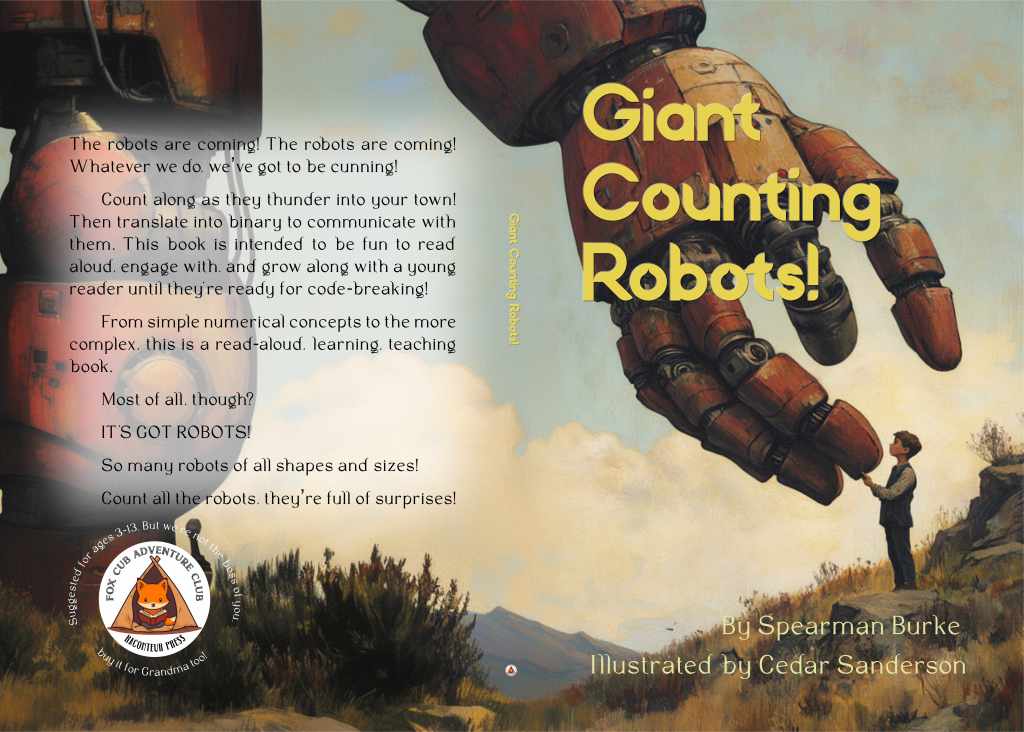
This Thanksgiving saw the debut of Raconteur Press’s first Fox Cub Adventure Club book! I’m still very excited about it. The adventure started back in July, when a smart-ass comment led to Spearman Burke being seized by a poem that wouldn’t let him go. It was good stuff, and while we all laughed, the serious suggestion was made that it should be illustrated and brought out as a children’s book.
That was the easy part, the concept of a book. The more difficult bits were choosing a size, should it be a hardcover? And then – well, let me back up a smidge. You see, a paperback POD book from Amazon, which is what we decided to stay with for this book, need only be 24 pages long. A case laminate hardcover, which is in my opinion the superior choice for a book meant for young children, must be no less than 76 pages long. My dear readers. A picture book is long at 40 pages! We started brainstorming how to fill up the remaining pages. In other books (like the Postcard anthologies) we have chosen to use an essay, with illustrations, and activity pages to fill up the space. Coloring pages seem logical for a children’s book, but any pages that invite coloring or writing on them will lead libraries and schools to pass over that book. In Giant Counting Robots! the choices were clear: a teaching guide for basic math concepts, and an encryption decoding section for ASCII and binary. This also lets the book grow along with a young reader, from pointing at robots and counting along, to translating the binary messages placed through the book and learning how to talk to robots.
Once we knew what we were going to do, and content had been written, illustrations created, layout began. I’ve blogged here before about using Affinity Publisher for illustrated books, but I get many questions, so here we go again!

I created a template to begin with, as I know I will be creating other books which will need to have the same dimensions, in the future. The size may vary for you, but keep in mind if you plan to use a POD vendor, you’ll want to know which sizes they will create – Amazon is very limited, which is why we don’t plan to stay with them in the future. I currently have researching Ingram Spark and BookVault on my to-do list.

Paperback has a lot more options, including a custom size, but keep in mind if you choose a horizontal layout (landscape) the book will not be eligible for expanded distribution. There is no hardcover option at all for horizontal layout with Amazon.

So why are we limiting ourselves to Amazon? Because RacPress is royalty-share currently, and Pubshare is fantastic but uses only Amazon for this. Yes, D2D nominally offers royalty-share options and works with Ingram Spark, but their financial stuff is screwed up, to the point of being highly shady, and won’t accept some LLC EIN’s. We’d rather not deal with that – already had issues with it and took a giant step back from them when we ran into that particular problem. As I’d run into trouble when I created my children’s book, The Cute Moose, I knew layout and orientation would be an issue from the beginning so we sorted this out with author, illustrator, and press before we started work on the book.

While you can (and I’ll show that shortly) link and flow text from page to page in Publisher, I chose to keep each stanza of the poem independent. One of the reasons was to apply effects to a specific text block without changes being made to all the pages. For readability, I tried to place text on areas without much behind it… but that simply wasn’t possible on every page. For those like the left page shown above, I used effects like dropped shadows to give sufficient contrast for easy reading.

Here, where we replicated the poem in entirety for easier reading, you can see the text link arrows streaming from page to page and spread to spread. And I have said before, you could layout a novel with this program. It would be a massive pain in the tuchis and I emphatically do not recommend it. Atticus or even better, Vellum, are the software packages designed for novels and text-heavy books like anthologies, and Vellum will handle some illustrations as well. Publisher is meant for a book that will have text on illustrations, tables, figures, and very complex layout. It handles that extremely well, and I find working with it to be a joy.
Affinity themselves put out a lot of tutorials on how to use their products, which I recommend if you are considering, or have already bought, Publisher for this purpose.
I recommend turning on snapping, which will give you guidelines (non-printable, you see ’em but they don’t show up in the final product) as you move an element on the page. This allows you to easily center, or line up an edge with an existing element. I can’t catch them in a screenshot, but they allow for precise placement as below in the text boxes.

Any questions?
(note that I am not affiliated with Affinity, they have no idea I’m doing this, it’s just that their stuff is that good. Plus, Adobe is dreadful and I want everyone to know there are more affordable and user-friendly options for them.)


 Mad Genius Club
2 responses to “Illustrated Book Layout with Affinity Publisher”
We ADORE Affinity. We couldn’t lay out our big, complicated books without it. We also own, in addition to Affinity, their design and their photo components. They’re designed to work together.
I second everything Cedar says, including being wary of Ingram Spark! It’s a long story so don’t get me started. We work with them because it’s what libraries and bookshops want but when you ask questions, each person you speak to at Ingram will give you a different answer to the same question. A local bookseller/author has the same experience.
Seconded (thirded?) re: Affinity Publisher and its counterparts (Photo and Designer). It’s polished, modern, pro-level software that doesn’t cost an arm and a leg. I used Publisher when I was making things to sell on Etsy, and I bought the whole suite for my daughter, who ended up using mostly Affinity Photo for her art. If you’ve ever used Adobe, it won’t be a stretch to swap to this at all, either in terms of what it’s capable of or in terms of UI and workflows. And when you buy it, you *actually own* a copy, unlike Adobe. There’s a 50% off sale going on right now, btw.